Book an Appointment
Call Miami Beach Computer Repair Service at 786-780-1540
                   

(786) 780-1540

*


Miami Beach Computer Repair Service has provided the best mobile computer repair in Miami Beach, FL and the greater Miami Metropolitan Area since 1999. The term "mobile computer repair" means we come to you to resolve all your computer problems.

We repair laptops, desktops, PCs and Apple computers. One of our highly qualified staff will come to you, often the same day, to take care of all your repair needs.

Why not use the #1 rated company for computer repair in Miami Beach, FL?

Computer Repair 4.9 / 5 stars from 324 reviews
Why use a computer tech when you can have a Miami Beach based Computer Engineer? Mon-Sun 8:00am - 8:00pm

Call us at (786) 780-1540

Text us at (786) 780-1540

Email us your questions

Book an Appointment

"Great service and friendly staff. Got my computer fixed same day, thank you!"
Miami Beach Computer Repair Service 5 / 5 stars
"Dustin, the technician, did an awesome job. He kept me informed along the job. Techs like Dustin, make me a customer for life. "
Miami Beach Computer Repair Service 5 / 5 stars
"Wonderful service, from the initial phone call and scheduling, very upfront on costs. The tech showed up on time, with a 15 min courtesy call, he was professional, knowledgeable and gave great advice. He replaced my hard drive and got me back up and running. I would recommend this service. I chose it because of all the positive online reviews and I was not disappointed."
Miami Beach Computer Repair Service 5 / 5 stars
"Josh was again superb. He reinstalled my HP printer software and now I can scan once again. Much thanks for your service."
Miami Beach Computer Repair Service 5 / 5 stars
"Fast service! Fixed all of my computer problems and was very helpful in making suggestions on products I needed. He arrived on time and was professional. Overall a very pleasant experience and I will call again!"
Miami Beach Computer Repair Service 5 / 5 stars

Who is Miami Beach Computer Repair Service?

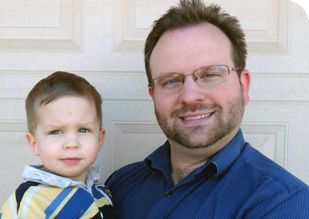
Miami Beach Computer Repair Service is owned by Matt Karls, an Electrical Engineer and a Computer Systems Engineer. We are a team of computer professionals focused on Service and quality, all our work is guaranteed.

If you have any computer, technology or IT problem in Miami Beach, FL we can fix it. We have been performing computer repair in Miami Beach full time since 1999. Feel free to give us a call or text us at (786) 780-1540.

Miami Beach Computer Repair Service's Computer Engineer

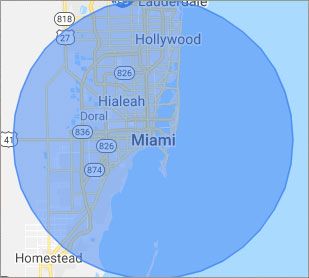
What is your Service Area for on-site Computer Repair?

Our primary on-site mobile service areas include the greater Miami Metropolitan Area as well as the Tampa, Orlando and Jacksonville metro areas.

We provide remote and mobile computer repair in Miami Beach, Fort Lauderdale, Hialeah, Hollywood, Pembroke Pines, Miami, Miramar, Coral Springs, Miami Gardens, Pompano Beach, West Palm Beach, Davie, Boca Raton, Sunrise, Plantation, Deerfield Beach, Boynton Beach, Weston and Coral Gables.

Our on-site Computer Service Area

What should someone expect that hires you for Computer Service?

Our mission is to fully resolve your computer problems quickly and affordably. If you want a Computer Engineer that can fix all of your computer problems instead of a computer tech, a computer geek, a technician or a computer guy that can only fix some of your problems; call us at (786) 780-1540.  

What types of Computer Services do you perform?

We service businesses and business clients in their homes, including:
 
  • Diagnose / repair hardware or software problems
  • Spyware, malware, trojan and virus removal
  • Setup wireless and small business networks
  • Laptop repair, PC repair and Apple repair
  • Hard drive data recovery

Miami Beach Computer Repair Service Contact Information

Miami Beach Computer Repair Service
Miami Beach, FL 33139
(786) 780-1540

Miami Beach Computer Repair Service is a Karls Technology company

* *
*
*
*
  *
* *


*
*
* * * * * * * * * * * * * * *
4.9 / 5 stars from 324 reviews

"Great service and easy to work with!!!"

Miami Beach Computer Repair Service 5 / 5 stars

"Anthony was very helpful in each step of the process, very professional."

Miami Beach Computer Repair Service 5 / 5 stars

"My tech was great and appeared knowledgeable, I won't hesitate to contact again and I would highly recommend."

Miami Beach Computer Repair Service 5 / 5 stars

"Taylor worked through 6 PC systems with great ease. Very satisfied with his skills and his help servicing our systems."

Miami Beach Computer Repair Service 5 / 5 stars
Best Antivirus Software of 2026: The Ultimate Guide to Cybersecurity Brands

In 2026, the digital threat landscape has shifted. We are no longer just fighting simple viruses; we are defending against AI-generated phishing, sophisticated ransomware-as-a-service, and complex identity theft. Choosing the right antivirus brand is no longer optional—it is the foundation of your digital life. At Karls Technology, we’ve analyzed the top-performing security suites of the […] The post Best Antivirus Software of 2026: The Ultimate Guide to Cybersecurity Brands appeared first on Computer Repair Blog.

Windows 11 22H2 Update

The most recent version of Windows 11, codenamed 22H2 or Windows 11 version 2022, is a small improvement over prior editions. According to reports, Windows 10 is the most popular desktop operating system. When Windows 11 was introduced last year, some Windows 10 customers upgraded. Some did, but the great majority did not. However, many […] The post Windows 11 22H2 Update appeared first on Computer Repair Blog.

Force Quit on MacOS

Control-Alt-Delete is the same thing as Option + Command + Esc in macOS. Make use of this keyboard shortcut to bring up the window to force quit applications, which will allow you to view what programs are currently active on your computer. You also have the option of selecting Force Quit from the Apple menu. […] The post Force Quit on MacOS appeared first on Computer Repair Blog.

Removing Icons on Desktop

One of the quickest and easiest methods to free up space and boost Windows 10’s performance is to get rid of the icons cluttering your desktop. In Windows 10, you can quickly and easily clear your desktop of icons with only a few clicks. It’s as simple as right-clicking an icon on the Windows 10 […] The post Removing Icons on Desktop appeared first on Computer Repair Blog.

Adding Shortcuts to Desktop Taskbar

Pinning a new shortcut to your Windows taskbar makes it instantly accessible from wherever on your computer. To see every app on your Windows device, press the Windows key, then click All programs. To pin an app to the taskbar, right-click it, select “More,” and then click “Pin to taskbar.” If the program is already […] The post Adding Shortcuts to Desktop Taskbar appeared first on Computer Repair Blog.

Helpful Tip: Free Up Space on PC

Media files are the biggest space hogs on a computer’s hard drive. It is suggested to put them away temporarily. Files can be stored in the cloud using OneDrive, a feature built into Windows 10 and Windows 11. The cloud storage space provided by OneDrive makes it simple to copy large files off your local […] The post Helpful Tip: Free Up Space on PC appeared first on Computer Repair Blog.

Windows Text-To-Speech

The Windows text-to-speech functionality is a vital aid for the visually impaired. It’s helpful if you learn best through listening or if you have reading difficulties like dyslexia. This function reads out loud everything you see on the screen, lists the currently running apps and windows, and more. Windows Narrator, a text-to-speech tool, is built […] The post Windows Text-To-Speech appeared first on Computer Repair Blog.

Windows OS is Unresponsive – Fast Startup

Turning off this feature could be the quickest and easiest approach to solve this problem. The useful function known as “Fast Startup” maintains your Windows OS in the hibernation mode so that it does not need to be completely relaunched after it has been shut down. This results in a significantly quicker reboot. Even though […] The post Windows OS is Unresponsive – Fast Startup appeared first on Computer Repair Blog.

Microsoft Fixes Bug on Windows 10

Microsoft has fixed an error that could cause the taskbar and desktop to disappear on Windows 10 computers. The same problem has been attributed by the corporation to the consumers’ gadgets freezing and not responding to input, according to Bleeping Computer. They also share that the affected versions are 20H2, 21H1, 21H2, and 22H2. Make […] The post Microsoft Fixes Bug on Windows 10 appeared first on Computer Repair Blog.

Disabling Game Mode on PC

By switching to “Game Mode,” your PC will be set up for maximum gaming performance. While this is fantastic during gameplay, it may cause your computer to run more slowly during other activities. You can improve your computer’s speed by disabling Game Mode. Even if you’ve never played a video game in your life, there’s […] The post Disabling Game Mode on PC appeared first on Computer Repair Blog.